
Sự phổ biến ngày càng tăng của công việc từ xa và lai đã thay đổi cơ bản cách các đội tương tác và tạo ra cùng nhau. Đã qua những ngày khi sự hợp tác hiệu quả có nghĩa là đứng quanh bảng vật lý, cố gắng ghi lại những ý tưởng trước khi ai đó xóa chúng hoặc đi đến biểu đồ lật ở phòng khác. Nhu cầu kinh doanh ngày nay kêu gọi các công cụ kết nối mọi người tham gia một cách liền mạch, bất kể họ ở đâu.
Đây là thế giới của bảng trắng kỹ thuật số-một bức tranh ảo mạnh mẽ, dựa trên mây, nơi các đội động não, lập kế hoạch, hình dung và thực hiện cùng nhau. Và đi đầu trong phong trào này là qtenboard, một giải pháp bảng trắng kỹ thuật số kết hợp cảm ứng độ chính xác cao, các công cụ đám mây mạnh mẽ và các tính năng ai tiên tiến để mang các đội Hybrid đến gần hơn bao giờ hết.
Cho dù bạn đang ở trong một phòng họp, một văn phòng tại nhà, hoặc nửa vòng thế giới, bảng trắng kỹ thuật số được hỗ trợ bởi các nền tảng như qtenboard làm cho sự hợp tác cảm thấy tự nhiên, trực quan và linh hoạt không ngừng.
Bảng trắng kỹ thuật số là một không gian làm việc ảo hỗ trợ đám mây cho phép nhiều người tham gia đóng góp ý tưởng, phác thảo, ghi chú và chú thích trong thời gian thực. Không giống như bảng xóa khô truyền thống, đòi hỏi sự hiện diện vật lý, sửa đổi bằng tay và tiết kiệm thủ công, bảng trắng kỹ thuật số cho phép các thành viên trong nhóm tham gia từ bất kỳ thiết bị và địa điểm nào-Bao gồm cả máy tính xách tay, máy tính bảng, và thậm Chí cả điện thoại thông minh.
Quan trọng nhất, một bảng trắng kỹ thuật số bảo quản Phiên họp của bạn bằng kỹ thuật số. Điều này có nghĩa là ý tưởng không bị mất khi ai đó xóa bảng vào cuối cuộc họp, và các đội có thể truy cập lại hoặc xây dựng trên các phiên trước không đồng bộ.
Tại trung tâm của Cuộc Cách Mạng hợp tác này là bảng trắng kỹ thuật số của qtenboard, giúp tăng cường các tính năng bảng trắng cơ bản với các công cụ hỗ trợ, lưu trữ đám mây, hợp tác nhiều người dùng và đảm bảo quyền truy cập cấp độ doanh nghiệp ở mọi nơi nhóm của bạn hoạt động.
Trong những ngày đầu làm việc từ xa, các đội Đấu Tranh để tái tạo sự hợp tác thể chất trực tuyến. Những người tham gia từ xa thường cảm thấy như khán giả, xem chia sẻ màn hình và chờ đợi âm thầm cho đến lượt họ nói. Bảng trắng kỹ thuật số thay đổi tất cả.
Với bảng trắng kỹ thuật số nền mây của qtenboard:
Mức độ đồng bộ hóa này không chỉ gia tăng-Về cơ bản nó sẽ định hình lại cách các nhóm suy nghĩ và làm việc cùng nhau.
Các Phiên động não truyền thống dựa vào các điểm đánh dấu, ghi chú dính và bản sao ảnh. Nó hỗn loạn, lộn xộn và dễ mất đi những hiểu biết quan trọng. Bảng trắng kỹ thuật số giải quyết vấn đề này bằng cách tự động lưu mọi ý tưởng, chú thích và sửa đổi thành đám mây.
Với bảng qtenboard, bảng trắng kỹ thuật số trở thành một nền tảng kiến thức vĩnh viễn, vì vậy không có gì bị lãng quên, trùng lặp hoặc thất lạc. Các đội có thể xem lại các Phiên trước, xuất khẩu hình ảnh có chú thích hoặc sử dụng công cụ ai để tóm tắt các giao dịch mang tính chính.
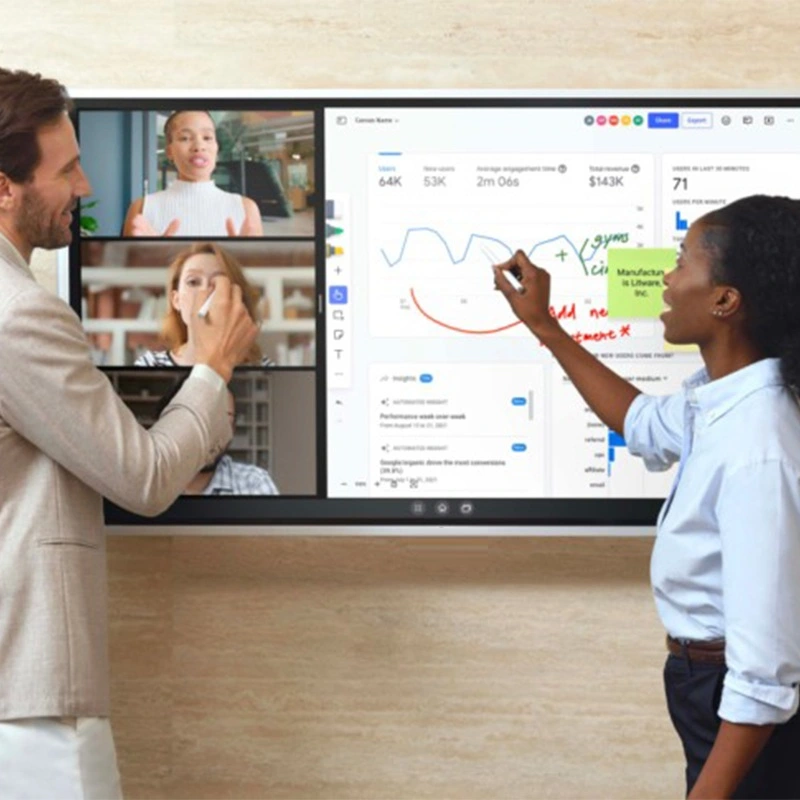
Không phải tất cả các bảng trắng kỹ thuật số đều được tạo ra bằng nhau. Khi đánh giá một giải pháp, một số tính năng nhất định phân biệt nền tảng mạnh mẽ với các công cụ cơ bản. Dưới đây, chúng tôi giải thích những khả năng này-và cách qtenboard Cung cấp chúng:
Một dấu hiệu của bảng trắng kỹ thuật số tuyệt vời là một bức tranh vô hạn-một không gian hầu như vô biên, nơi các ý tưởng không bị ràng buộc bởi các cạnh vật lý. Các đội có thể:
Bảng trắng kỹ thuật số của qtenboard bao trùm khái niệm này một cách đầy đủ, cho phép các bản đồ tâm trí phức tạp, bản đồ đường phố nhiều tầng, hoặc các hệ sinh thái thị giác trải dài tồn tại trong một không gian làm việc liên tục.
Để hợp tác cảm thấy liền mạch, mọi cập nhật phải xuất hiện ngay lập tức cho tất cả người dùng-cho dù họ đang ở trong phòng hay tham gia từ một vị trí từ xa. Bảng trắng kỹ thuật số của qtenboard Cung cấp đồng bộ hóa thời gian thực trên mọi thiết bị được kết nối:
Điều này có nghĩa là bảng trắng kỹ thuật số của bạn phản ánh mọi chú thích, mọi ý tưởng, và mọi thay đổi trong thời điểm nó xảy ra-không bị lag, không có xung đột phiên bản, không nhầm lẫn.
Một trong những ưu điểm lớn nhất của bảng trắng kỹ thuật số là lưu trữ liên tục. Không giống như bảng vật lý, bảng kỹ thuật số lưu tự động và an toàn trong đám mây. Điều này cho phép các đội:
Qtenboard tự động tiết kiệm đám mây và cung cấp các điều khiển truy cập có thể tùy chỉnh, vì vậy các đội luôn ngăn nắp và an toàn-không cần nỗ lực thủ công.
Khi nhiều người làm việc trên một tấm vải được chia sẻ, thật khó để theo dõi ai đã thêm vào cái gì. Bảng trắng kỹ thuật số sử dụng mã màu để phân biệt sự đóng góp của từng cá nhân, làm cho sự hợp tác sạch hơn và phân tích dễ dàng hơn.
Qtenboard tiếp tục thực hiện điều này với nhãn người dùng và các điểm nhấn đóng góp giúp các nhóm ghi nhận ý tưởng một cách chính xác và xác định các mẫu tham gia trong các phiên.
Mẫu tiết kiệm thời gian và tính nhất quán của ổ đĩa. Cho dù nhóm của bạn đang tung ra một dự án, tiến hành hồi cứu hoặc xây dựng bản đồ hành trình khách hàng, bảng trắng kỹ thuật số của qtenboard bao gồm các mẫu có cấu trúc hướng dẫn từng phiên hợp tác-Giảm thời gian thiết lập và tăng tác động.
Các đội không cần phải tái tạo khuôn khổ cho mỗi cuộc họp; họ bắt đầu với một cấu trúc chuyên nghiệp và đi thẳng vào sự hợp tác.
Sự hợp tác tuyệt vời không chỉ trực quan-mà còn là trò chuyện. Bảng trắng kỹ thuật số hiện đại bao gồm các công cụ cho:
Qtenboard tích hợp các công cụ này trực tiếp vào giao diện bảng trắng để phản hồi xảy ra trong bối cảnh, mà không phá vỡ quy trình làm việc hoặc thảo luận Phân mảnh.
Các tệp tĩnh trở nên năng động khi được nhúng trong bảng trắng kỹ thuật số. Tải lên hình ảnh, PDF, bảng tính, hoặc mô hình thiết kế và chú thích trực tiếp trên chúng. Khả năng này biến các tài liệu thụ động thành các điểm thảo luận tương tác.
Với qtenboard, phương tiện truyền thông nhập khẩu trở thành một phần của hệ sinh thái hợp tác-trực quan, có thể chỉnh sửa và dễ dàng chia sẻ.
Sự cộng tác phải nhanh nhẹn-nhưng nó cũng phải được an toàn. Bảng trắng kỹ thuật số của qtenboard cung cấp:
Điều này có nghĩa là các nhóm có thể cộng tác tự do, trong khi nội dung nhạy cảm vẫn được bảo vệ khỏi truy cập trái phép.
Trí tuệ nhân tạo đang nhanh chóng trở thành một nhân tố cộng tác. Tính năng ai của qtenboard giúp các đội làm việc thông minh hơn, không khó hơn:
Ai không phải là một mánh lới Quảng Cáo-đó là một nhân lực giúp các đội tạo ra kết quả chất lượng cao với ít nỗ lực thủ công hơn.
Bảng trắng kỹ thuật số tốt nhất hoạt động ở mọi nơi-trên màn hình cảm ứng tương tác lớn, máy tính xách tay, máy tính bảng và điện thoại. Nền tảng của qtenboard là device‑agnostic, có nghĩa là đội ngũ của bạn có thể đóng góp từ bất cứ đâu, với bất kỳ phương thức nhập liệu nào:
Tính linh hoạt này mở rộng sự tham gia và phù hợp với các luồng công việc và sở thích khác nhau.
Nhiều nền tảng cạnh tranh trong không gian bảng trắng kỹ thuật số, mỗi nền tảng đều có những điểm mạnh độc đáo. Dưới đây là một sự so sánh nhanh chóng các tùy chọn hàng đầu và cách qtenboard ngăn xếp:
| Nền tảng | Tốt nhất cho | Điểm mạnh | Ghi chú |
|---|---|---|---|
| Qtenboard | Hợp tác doanh nghiệp & lai | Công cụ ai, bảo mật đám mây, tính linh hoạt của thiết bị | Giải pháp đa năng lý tưởng |
| Tranh tường | Visual Team Collaboration | Mẫu mở rộng & công cụ tạo điều kiện | Tuyệt vời cho các nhà xưởng |
| Figjam | Đội ngũ thiết kế | Giao diện nhẹ và trực quan | Tốt nhất cho luồng công việc UI/UX |
| MIRO | Lập kế hoạch phức tạp | API Nhà phát triển & bản Đồ Chiến Lược | Rất linh hoạt |
| Canva | Đánh bóng thị giác | Tài sản Thiết kế & đơn giản | Tốt nhất cho bảng trình bày |
| Ván bão | Ý Tưởng cấu trúc | Báo cáo & Phân Tích | Tuyệt vời cho các hội thảo của doanh nghiệp |
Trong khi mỗi công cụ phục vụ các trường hợp sử dụng cụ thể, bảng trắng kỹ thuật số của qtenboard nổi bật với tính bảo mật cấp độ doanh nghiệp, nâng cao ai, đồng bộ hóa thời gian thực và hỗ trợ nhóm Hybrid-Tất cả đều nằm trong một nền tảng được thiết kế cho các quy trình làm việc hiện đại.
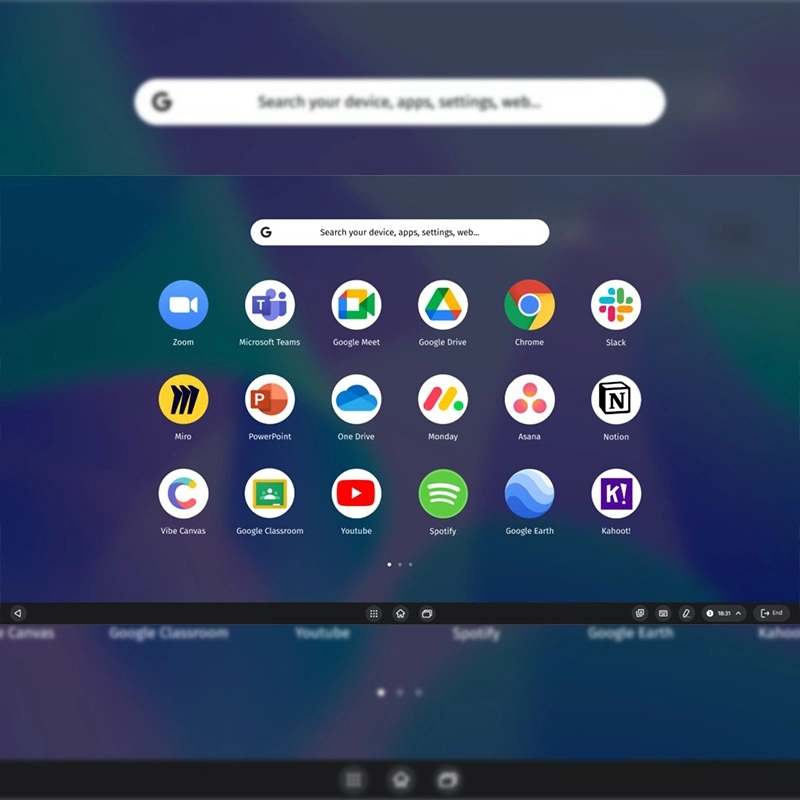
Bảng trắng kỹ thuật số khắc phục những hạn chế về không gian và các vấn đề tầm nhìn của bảng vật lý. Không còn giới hạn trong một phòng, họ hỗ trợ thực tế lai nơi những người tham gia từ xa và người nội bộ cộng tác như nhau, với lưu trữ đám mây đảm bảo không có gì bị xóa hoặc lãng quên.
Mặc dù bảng trắng kỹ thuật số dựa trên phần mềm và device‑agnostic, một bảng tương tác kết hợp phần mềm với phần cứng chuyên dụng-Màn hình cảm ứng lớn được thiết kế để hợp tác trong phòng. Các Tổ Chức thường được hưởng lợi từ Cách tiếp cận lai: Sử dụng màn hình tương tác như các thiết bị qtenboard để truy cập vào môi trường bảng trắng kỹ thuật số đồng thời cho phép người dùng từ xa tham gia từ các thiết bị của riêng họ. Sự pha trộn này Tối đa hóa sự linh hoạt và gắn kết cho các đội hiện đại.
Trong Bối Cảnh công việc lai tạo Ngày nay, các công cụ cộng tác phải mạnh mẽ, bao trùm và thích nghi. Bảng trắng kỹ thuật số không chỉ là một công cụ Vẽ-Nó là một trung tâm cộng tác Trung tâm cho phép các đội làm việc, giao tiếp và tạo ra cùng với sự rõ ràng và nhanh nhẹn chưa từng có.
Với các giải pháp như bảng trắng kỹ thuật số qtenboard, các đội có bất kỳ kích thước nào-phân phối, điều khiển từ xa hoặc phân bố chung-Có thể suy nghĩ tốt hơn, chia sẻ ý tưởng nhanh hơn và nắm bắt được cái nhìn sâu sắc hơn bao giờ hết.
Bảng trắng kỹ thuật số không chỉ đơn thuần là tương lai của làm việc nhóm-Chúng là hiện tại. Nắm bắt sự thay đổi, trao quyền cho các đội của bạn và mở khóa toàn bộ tiềm năng hợp tác trực tuyến ngay hôm nay.
Nhấp để ĐọC Chi tiết sản phẩm và tìm hiểu về các tính năng chức năng và hiệu suất thực tế của sản phẩm.
📖Đọc sản phẩm
 VIE
VIE
 EN
EN  MAY
MAY  TH
TH  CHT
CHT  ID
ID  BUR
BUR  FIL
FIL  HKM
HKM  LAO
LAO  SIN
SIN